An AI personal trainer that plans around your life
Brink takes what you tell it about your goals, experience, equipment and schedule, and turns it into a training plan you can start today. As you log sessions and update your answers, the plan moves with you.
Available on iPhone
What is an AI personal trainer?
An AI personal trainer is software that does the programming a human coach would do by hand. You answer questions about your goal, experience, equipment and availability, and it generates a structured plan: which exercises, in what order, for how many sets and repetitions, across your week. Brink then adjusts that plan as you log training.
- Inputs used
- Goal, experience, equipment, frequency, session length, preferences
- Adjusts from
- Your feedback and logged training
- Editable
- Yes, every exercise, set and session
- Not a substitute for
- Medical or physiotherapy advice
How does Brink build a training plan?
An AI personal trainer is software that does the programming work a coach would normally do by hand. Instead of picking a template from the internet and hoping it fits, you answer questions about your situation and the app generates a plan from those answers: which exercises, in what order, for how many sets and repetitions, across how many days a week.
The useful part is not that a computer wrote the plan. It is that the plan can be regenerated the moment something changes. A new gym, a shorter week, a shift in what you are training for. Rewriting a program by hand is the kind of task most people put off until they simply stop training. Software does not put it off.
Brink does this for training and for nutrition in the same app, so your calorie and protein targets sit alongside the sessions rather than in a separate tool you forget to open.
What Brink uses to personalize your plan
Nothing here is guessed. Each input maps to a specific decision in how your week is built.
- Your goal
- Building strength, adding muscle, losing fat or staying consistent all lead to different session structures, exercise choices and repetition ranges.
- Experience level
- A first month in the gym and a fifth year need different complexity, volume and progression speed.
- Available equipment
- Barbells, dumbbells, machines, bands or nothing at all. Brink only programs movements you can actually perform.
- Training frequency
- Two days a week and five days a week are both valid. The split changes to match.
- Session length
- A thirty minute window and a ninety minute window need different exercise counts and rest structures.
- Preferences and feedback
- Movements you enjoy, movements you would rather skip, and how sessions have been feeling all feed back into what comes next.
- Your logged training
- The weights and repetitions you record build a history that informs future targets.
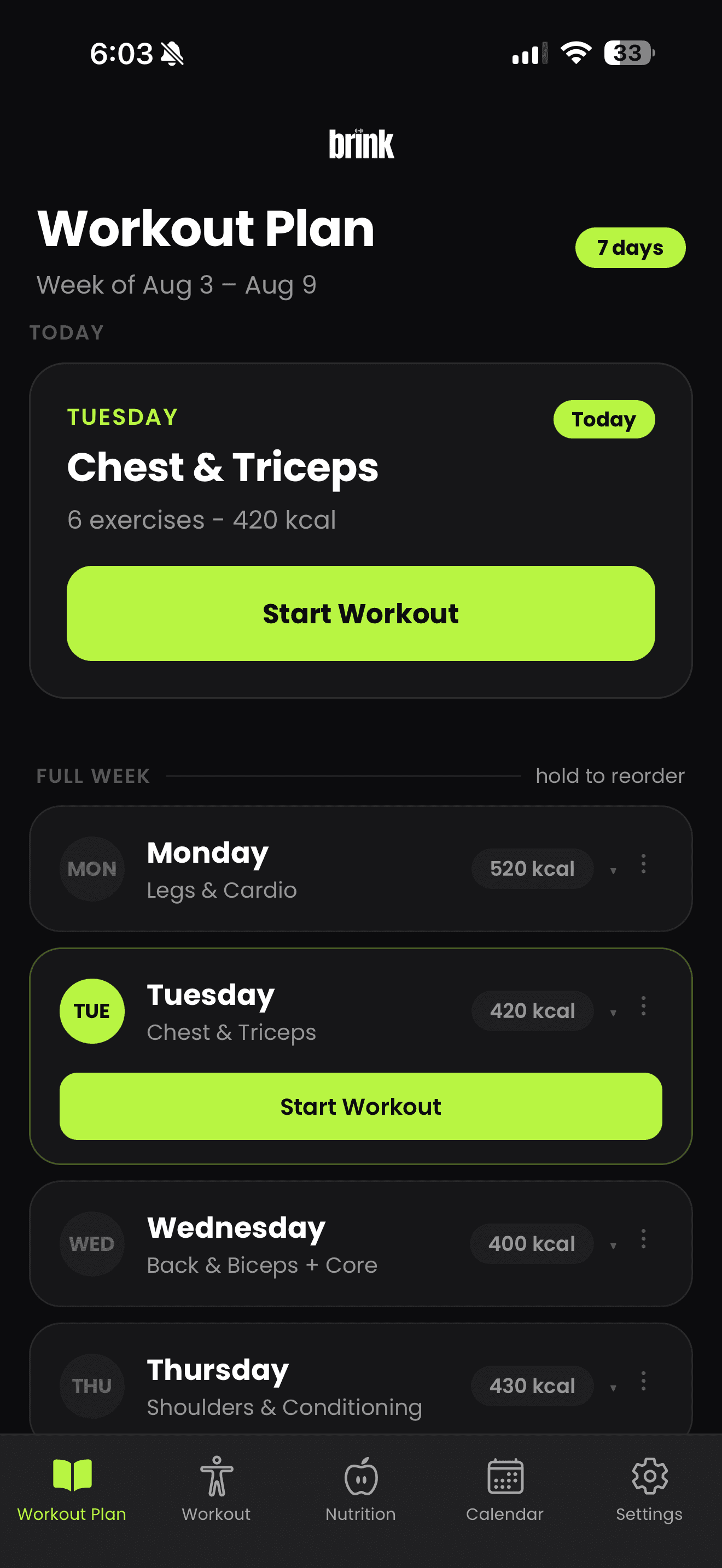
How the plan changes over time
A plan that never changes stops being personal after a few weeks. Brink treats your plan as something that keeps moving in three ways.
- You change your inputs. Update your goal, equipment, training days or session length and the plan is rebuilt around the new answers.
- You give feedback. Tell Brink a session was too long, an exercise did not suit you, or you want more of something. Future sessions reflect it.
- You log your training. The weights and repetitions you record build a picture of where you are, which shapes the targets you see next.
You can also edit anything directly. Swap a movement, change a set count, move Thursday to Friday. The plan is a starting point you own, not a prescription.
Benefits and limitations
Brink is good at the mechanical parts of coaching: writing structured plans quickly, remembering what you lifted, keeping rest consistent, adjusting numbers as you progress and keeping nutrition in view alongside training.
It is not good at the parts that need eyes and hands. It cannot watch your technique, judge how a movement feels in your shoulder, or read the difference between ordinary fatigue and an injury developing. If you are returning from injury, managing a health condition, or working towards a competitive standard, a qualified professional is worth the money.
Questions about AI coaching
How is an AI personal trainer different from a human coach?
A human coach brings judgment, accountability and hands on technique work that software cannot replace. Brink handles the parts that are mechanical: writing the plan, choosing exercises for your equipment, tracking every set and adjusting the numbers as you go. Many people use both.
What information does Brink use to build my plan?
Your goal, your experience level, the equipment you have access to, how many days a week you can train, how long a session should be, and the exercises you prefer or want to avoid. Your logged training then feeds back into future sessions.
How often should I update my inputs?
Whenever something real changes. A new gym, a new schedule, a shift in what you are working towards, or a period where sessions feel too easy or too hard are all good reasons to update your setup.
Can Brink tell me if an exercise is safe for me?
No. Brink cannot assess injuries, pain or medical conditions. If something hurts or you are unsure whether a movement suits you, stop and speak with a qualified health professional.
Keep reading
- The workout plannerGoal based planning, home versus gym equipment, scheduling, set tracking and editing your plan.
- The nutrition trackerPhoto, text and manual meal logging, calorie and macro targets, and how accurate the estimates are.
- Frequently asked questionsPricing, Android availability, plan editing, equipment requirements and medical disclaimers.
Get your first plan today
Answer a few questions in Brink and start your first session on iPhone.
Free to download, with a paid subscription for full access.
- No account needed to browse this site
- No trackers on this page
- Requires an iPhone running iOS 16.4 or later.